Yes. A lot of guides still say Roku blocks IPTV players — that is out of date. IBO Player Pro is in Roku's own Streaming Store, so there is no sideloading and no casting workaround. The same steps work on a Roku Streaming Stick, a Roku player and a Roku TV. Seven steps, about ten minutes.
Install the right version. There are three IBO listings on Roku. If you are in the US, install Ibo Player Pro (US). Outside the US, install Ibo Player Pro (Global). The plain Ibo Player Pro listing is the original app, which the developer confirmed cannot be updated past v1.16.0 — it still installs, but you will be running an old build and the newer setup steps may not match what you see.
Any Roku TV, streaming player or stick, connected and linked to a Roku account.
Installed from the Roku Streaming Store. No sideloading, no developer settings.
Server URL, username and password — or the M3U link, if that's what we sent.
IBO Player Pro is the player; EyePTV supplies the channels. The app has none of its own. It normally starts with a trial and then asks for its own per-device activation — that fee goes to IBO, not to us, and it is not part of your EyePTV subscription.

Press Home on the Roku remote, select Store or Streaming Store, then open Apps or Search.
Search for Ibo Player Pro.
In the US, choose Ibo Player Pro (US). Outside the US, choose Ibo Player Pro (Global). Select Add app — older Roku interfaces call it Add channel.
Wait for Roku to install it. It usually lands at the bottom of your Home screen app list.
Go back to the Roku home screen and launch IBO Player Pro.
Added it from roku.com or the mobile app and it hasn't appeared on the TV? Go to Settings → System → System update → Check now. That is Roku's own way of forcing newly added apps to sync.
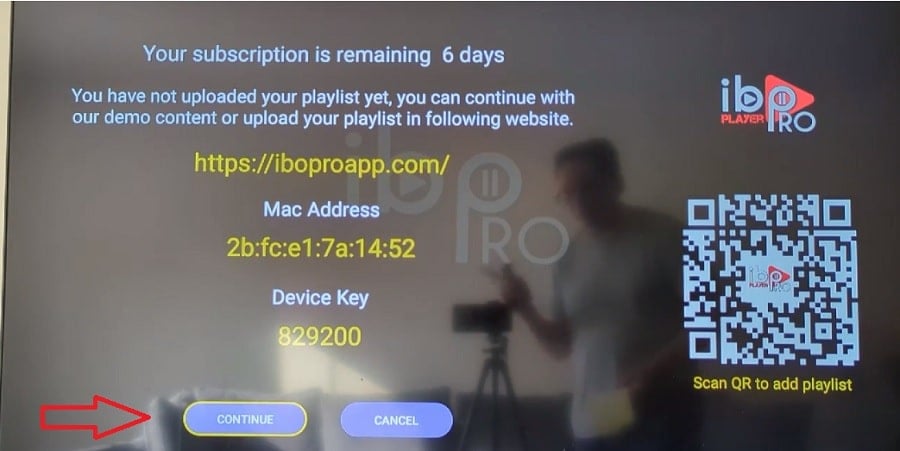
Open the Account section if it isn't already showing. The app displays a MAC Address / Device ID and a Device Key. Photograph the screen or copy both down exactly.
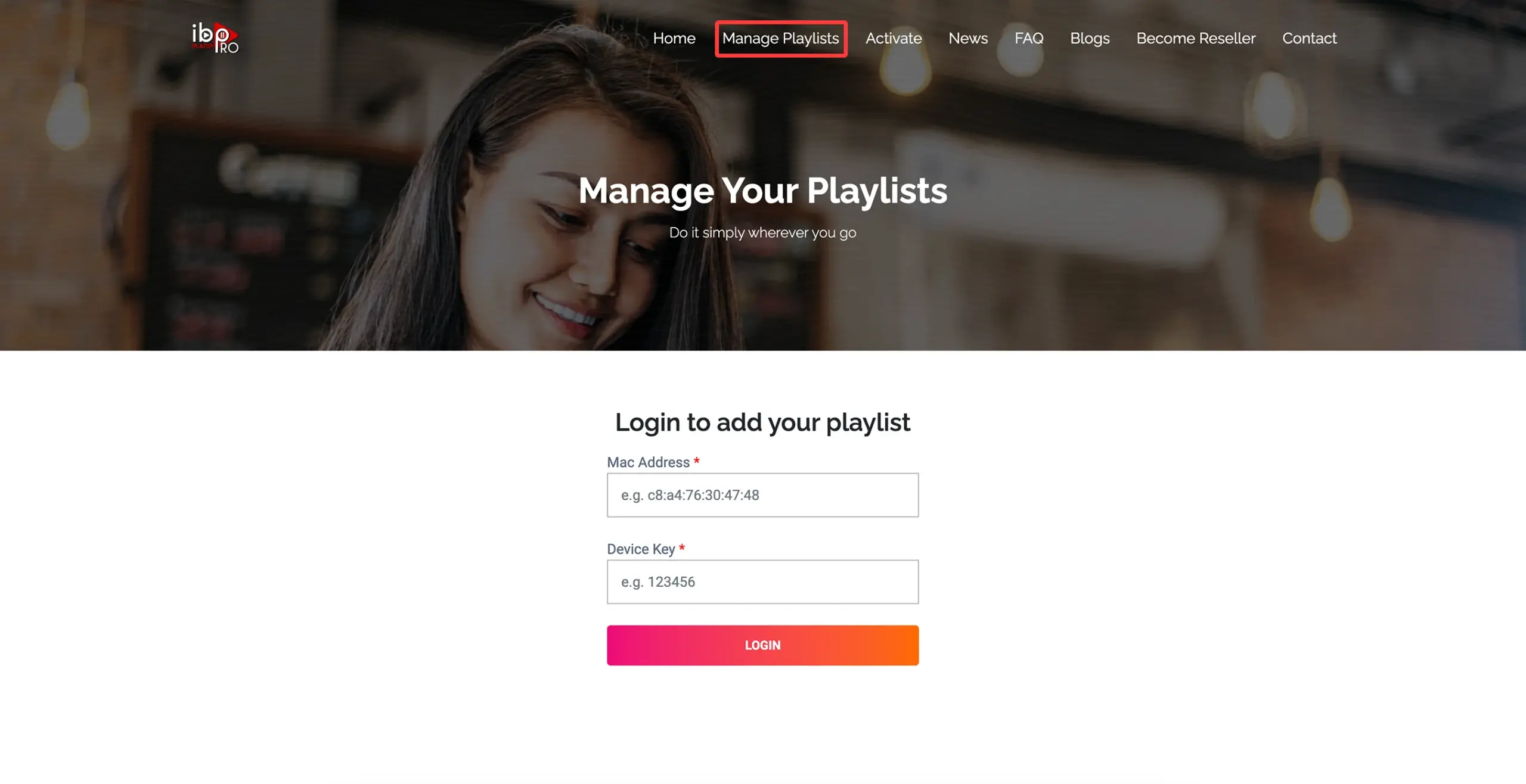
On a phone or computer, open the Manage Playlists page shown by the app on your TV, and sign in with those two values.
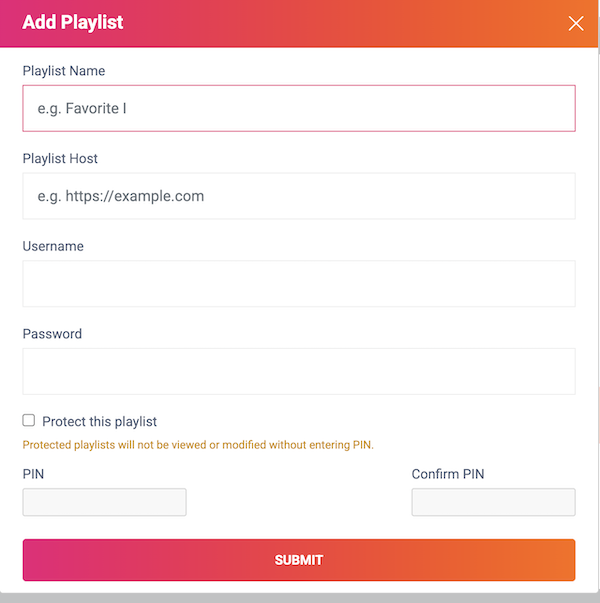
Create a playlist named EyePTV, then fill in whichever details we sent you:
Xtream Codes (what we recommend on Roku) — enter the server host, username and password. M3U / M3U8 — paste the complete playlist URL. Then select Save.
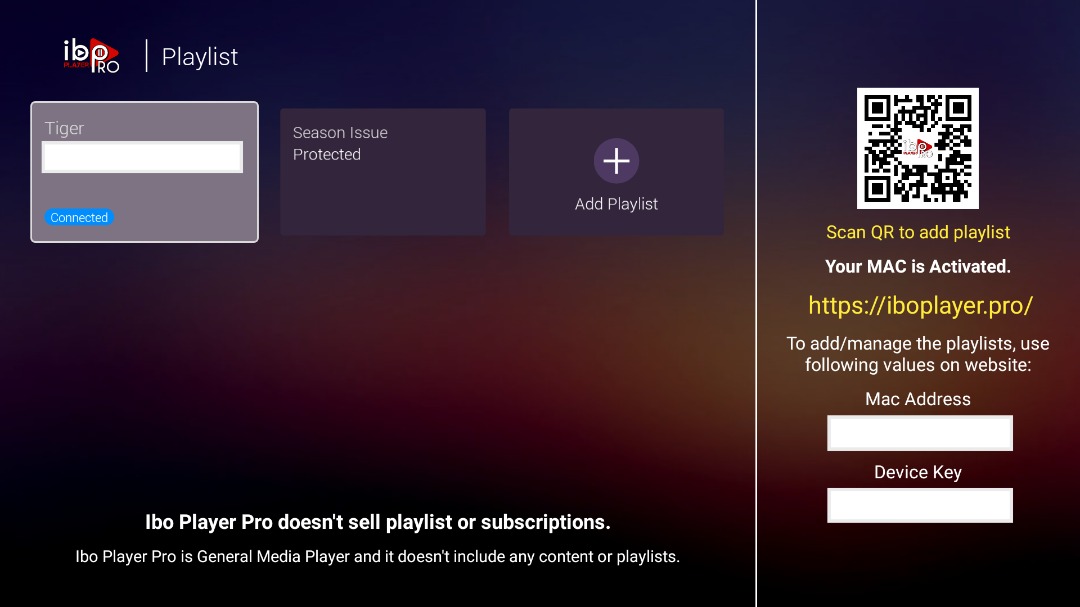
Back on the TV, reopen IBO Player Pro. If it offers Refresh, Reload, Continue or Change Playlists, use that to pull in the playlist you just added.
Your Live TV, Movies, Series and guide sections load. That's you set up.
The five things that go wrong on Roku, and how to fix them.
Store listings vary by country. Search Ibo Player Pro (US), then Ibo Player Pro (Global), then plain Ibo Player Pro. If no version is available in your region, message us — we'll suggest another Roku player or a cheap stick that will run on the same TV.
Apps added from the website or the Roku mobile app don't always appear straight away. Go to Settings → System → System update → Check now. Roku recommends this specifically to sync newly added apps.
Check every character — the letter O and the number 0 are the usual culprits. Then confirm you're on the portal your app actually displays. The (US) and (Global) builds can use different account flows, so an address from an old guide may not match.
Reopen the app and use Refresh, Reload or Change Playlists. If it's still empty, the server URL or M3U link was probably cut short when it was pasted. Send us a screenshot and we'll check it against your account.
That's usually a stream format the Roku build can't decode, not a broken subscription. Tell us which channel does it — we can often point you at the same channel on a different feed, or confirm whether it affects the whole package.
Yes. The same Store flow applies to Roku TVs, Roku streaming players and Roku sticks, as long as the app is available in your region's store.
Send us a photo of your TV screen on WhatsApp. Tell us which IBO version you installed and whether you're using Xtream Codes or M3U.
Get help on WhatsAppThe screenshots on this page come from public pages showing real Roku and IBO interfaces; each credits its source underneath. None are AI-generated. Roku menus vary by device and software version. Roku Store availability and the (US) / (Global) version split checked August 2026 — store listings change by region, so tell us if you can't find the app.